E-Z-GO TXT (36V and 48V variants) golf carts are widely used and generally reliable — but when they fail or run poorly, an organized troubleshooting sequence saves time and money. This guide walks technicians and owners through safe diagnostic steps, what to test first, how to interpret readings, and when to call professional golf cart service. If the problem is battery related, we recommend checking our golf cart battery replacement services. For general upkeep, see our golf cart maintenance page.
Key references used: E-Z-GO owner and service manuals (TXT series) and community/tech articles covering PDS and TXT troubleshooting.
Quick safety checklist (always do this first)
- Disconnect service key and remove the key before working on electrical components.
- Wear eye protection and insulated gloves when testing batteries.
- Work in a well-ventilated area when charging or testing batteries.
- Ensure cart is on level ground and wheels are chocked before running tests.
(These precautions appear in official manuals and are standard technician practice.)
Overview: Most common TXT failure categories
- Battery / charger problems (weak pack, bad cell, corroded terminals).
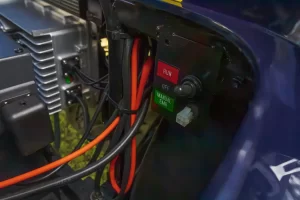
- Solenoid and high-current wiring issues (clicking solenoid, voltage drop on large lugs).
- Controller faults (SEPEX or PDS depending on model year) — dead throttle response, lurching, no movement.
- Motor & brushes (worn brushes or commutator problems causing intermittent movement).
- Throttle/Potentiometer or linkage & F/R switch (bad pedal pot, misadjusted linkages).
These categories will guide the test sequence below.
Step-by-step diagnostic sequence (recommended order)
1) Confirm the simple stuff: key, fuses, and connections
- Turn key to ON; verify dash lights/indicators illuminate. If nothing lights, check main fuse, ignition switch, and battery connections.
- Inspect battery terminals and cable lugs for corrosion, loose clamps, or broken cables. Clean and tighten if needed. Corroded or loose cables are the leading cause of “dead cart” symptoms.
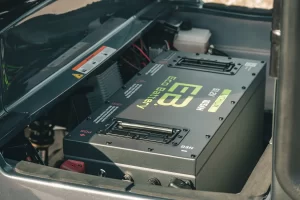
2) Measure pack voltage and individual batteries (electric carts)
- Use a multimeter to confirm total pack voltage (36V packs ~36–40V fully charged; 48V packs ~48–54V fully charged depending on charger and batteries). If pack voltage is low, charge and retest. Weak batteries can mimic controller/solenoid failures.
- For a deeper check, record per-battery voltages — any battery significantly lower (~1V or more below others) points to a failing cell.
3) Charger check
- Verify charger status lights and measure DC output (if the charger is external) or proper charge cycles. A charger that never reaches float or fails to bring pack voltage up strongly suggests replacement or service. Official manuals outline charger checks for TXT carts.
4) Solenoid test (high-current relay)
- Turn key ON and press accelerator; listen for a solenoid click. If there’s no click, test for small terminal voltage at the solenoid activation posts when pedal is depressed. If the small post sees pack voltage but the big lugs do not pass voltage, solenoid may be faulty. If the solenoid clicks but cart won’t move, check voltage at the large lugs (should be equal when activated). Many common TXT no-movement issues are traced to solenoid or its wiring.
5) Controller and throttle diagnostics
- If batteries and solenoid check out, test the controller. For TXT models you might have a PDS (pulse-width) controller or other variants — service manuals have specifics. Typical checks:
- Measure voltage at B+ on the controller when pedal depressed.
- Check the small control voltage lines from pedal pot to controller; measure the potentiometer output while moving pedal (should sweep smoothly).
- Symptoms of controller failure: no throttle response despite proper pack voltage and solenoid operation, erratic lurching, or burned smell from controller.
6) Motor & brushes
- If controller is outputting voltage correctly but cart still won’t move, inspect the motor. Worn brushes, poor commutator contact, or a shorted winding can cause no-move or loss of power. Remove motor inspection cover and visually inspect brushes and commutator condition.
7) Forward/Reverse switch and wiring harness
- Check the F/R switch for continuity and correct operation; faulty F/R switches or damaged harness connectors can prevent movement or cause directional faults. Service manuals include wiring diagrams for the TXT series.
8) Intermittent problems — vibration, heat, or loose connections
- Intermittent stopping/starting often points to heat-related component failures (solenoid, controller, or resistor) or intermittent wiring/ground problems. Wiggle test harnesses while system energized (carefully) to provoke failures; inspect grounds and battery cable terminations. Community troubleshooting threads highlight how intermittent faults were traced to loose lugs or failing solenoids.
Practical testing tips & multimeter checks
- Always use the multimeter negative probe on the pack negative for a consistent reference.
- When checking for voltage drop, measure across the same lug/terminal before and after pressing the pedal or activating the solenoid — any significant drop (>0.5–1V under load) indicates high resistance (bad lug, cable, or terminal). Community guides give specific step sequences for probing controller, solenoid, and motor terminals.
When to replace parts vs. repair
- Replace battery bank if multiple batteries are below acceptable range or they refuse to hold charge after equalization.
- Replace solenoid if activation voltage is present but large lug voltage is not passed evenly. Solenoids can click yet still be internally faulty.
- Replace controller only after ruling out battery, solenoid, motor, and wiring — controllers are expensive; ensure correct model/spec for TXT series.
- Motor rebuild or brush replacement is cost-effective for worn brushes; full motor replacement if windings are burnt.
When to call Resort Life Service
If your tests show: major voltage drops under load, burned electronics smell, controller error indications, or you prefer certified techs to run advanced diagnostics, call our service department at (559) 831-1971 or visit golf cart service. We also provide professional golf cart battery replacement when batteries are the root cause.
FAQs
Q1 — My E-Z-GO TXT clicks but won’t move. Is it the solenoid or controller?
A1 — Start by checking pack voltage (must be in range). With the key ON and pedal pressed, measure small terminal activation voltage at the solenoid. If activation voltage exists and the solenoid clicks but the large lug voltage does not read equal on both sides, replace the solenoid. If the solenoid passes voltage yet the cart won’t move, test controller B+ output and motor. Solenoids can click but still be defective.
Q2 — How do I know if batteries need replacement or just charging?
A2 — Measure pack voltage after a full charge and then again under a moderate load. If the pack drops quickly or individual batteries show significantly lower voltages than the rest, replace the bad batteries. Batteries older than ~4–6 years commonly show capacity loss. Official manual charging cycles and per-cell voltage checks help confirm need for replacement.
Q3 — Cart runs but lurches when pressing pedal — controller or throttle pot?
A3 — Lurching is often the throttle potentiometer (pedal pot) or a failing controller. Measure the pot output while moving the pedal — it should sweep smoothly without jumps. If pot is clean and wiring is solid, consider controller testing or replacement.
Q4 — How do I test a TXT motor brush?
A4 — Remove the brush cover, visually inspect brush length and the commutator surface. Test with a multimeter for shorts and check brush springs for proper tension. Replace brushes if wear is significant or if pitted commutator surfaces exist.
Q5 — Are there common fuse/fusebox items to check on TXT models?
A5 — Yes — check all fuses for continuity and inspect the main fuse (or circuit breaker) in the high-current path. A blown main fuse often indicates a short or major overload — find root cause before replacing fuses repeatedly.
Q6 — My cart works in one direction but not the other — F/R switch?
A6 — Yes, a sticking or faulty forward/reverse switch is a common cause. Test continuity while toggling through positions and inspect wiring to/from switch. Replace switch as needed.
Q7 — How do I maintain TXT carts to minimize future issues?
A7 — Maintain clean, tight battery terminals; follow correct charging cycles; periodically inspect cables and connectors for corrosion; keep motor and controller compartments clean and dry. Schedule periodic professional golf cart maintenance to catch issues early.